
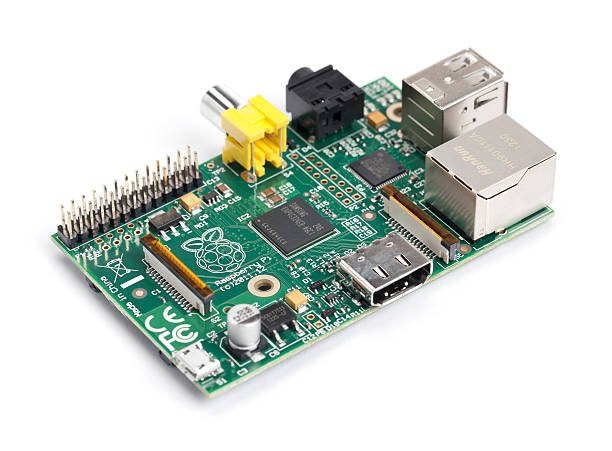
Raspberry Pi projects move fast in software—and stall when the physical side is a tangle of jumpers, dangling HATs, and connectors that fall off the moment you move the board. JIGMOD is a modular electronic circuit building system: platforms (M, L, XL), mountable modules, and dedicated Raspberry Pi adapters so the Pi sits on a stable base while you rearrange I/O around it.
JIGMOD was created to help with electronic product development. For Pi users, that means keeping the computer mounted while you iterate displays, storage, networking, and audio without rebuilding the whole fixture. Raspberry PI Model B and Model 3 / B+ JIGMOD Adapters mount the board to a JIGMOD platform; every JIGMOD module includes 4 standoffs and 4 screws for that same platform.
Why Pi builders benefit from a modular platform
- The Pi stays fixed while modules move—fewer “pull one wire, lose the demo” moments
- Adapters for Model B and 3/B+ keep mounting consistent across board revisions
- Breadboard Adapter (optional) gives a place for one-off glue circuits beside the Pi
- Product development stays closer to a real enclosure layout than a bare board on the desk
Five JIGMOD modules that pair especially well with Raspberry Pi
1. SD Card Slot JIGMOD
Pi projects live and die by removable storage for OS images, logs, and media. A mounted SD slot on the platform keeps card access deliberate and labeled beside the computer instead of hunting for a loose adapter on the bench.
2. USB 2.0 A Connector JIGMOD
USB is how most Pi peripherals arrive—keyboards, Wi‑Fi dongles, instrument bridges, and flash drives. A panel-style USB A module on the platform makes hot-plug ports part of the fixture, not a fragile hub hanging off the board.
3. RJ-11/12/14/45 Plug JIGMOD
Networked Pi builds—sensors on Ethernet, lab tools, or classroom kits—need a clean jack the operator can see. Mounting an RJ family plug on the platform turns networking into a repeatable mechanical interface instead of a cable wedged under the Pi.
4. LCD Screen JIGMOD
Headless SSH is fine until you need local status: IP address, experiment state, or a simple UI. An LCD module on the same platform as the Pi keeps the display aligned with the computer and the rest of the I/O.
5. Ribbon Cable Connector JIGMOD
Ribbon interconnects are common when a Pi talks to daughterboards, camera-style flex systems, or custom breakouts. A mounted ribbon connector gives a strain-relieved path off the platform so flex cables are not the only thing holding the stack together.
A simple Pi + JIGMOD starting pattern
- Pick a platform size (M, L, or XL) for the footprint you need
- Mount the matching Raspberry Pi adapter and seat the board
- Add the five modules above that match your project—or swap in others from the catalog as requirements change
- Iterate software on the Pi while the mechanical layout stays coherent
Browse Pi adapters, platforms, and modules on jigmod.com, or catch up on more builds in Articles.